上一个笔记最后提到SendRequest, 以下是SendRequest的序列图, 不是十分准确, 但可以有个大概的浏览.
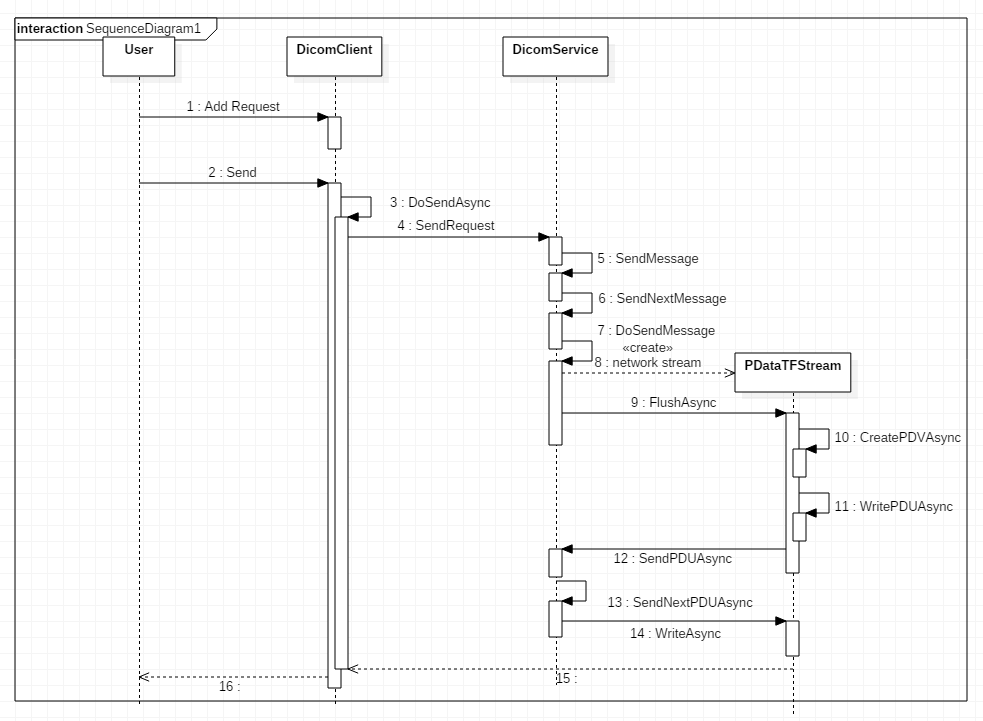
序列图当中, SendNextMessage和DoSendMessage是DicomService中两个重要的方法.
先看SendNextMessage方法
1 | private void SendNextMessage() |
里面出现2个数据结构: Queue<DicomMessage> _msgQueue 与 List<DicomRequest> _pending;
当request得到response的时候, 该msg才会从_pending列表中删除,
若_msgQueue和_pending都为空时, 即传输队列为空时, 会调用OnSendQueueEmpty
OnSendQueueEmpty在DicomClient中override1
2
3
4
5
6
7
8
9
10
11
12
13/// <summary>
/// Action to perform when send queue is empty.
/// </summary>
protected override void OnSendQueueEmpty()
{
lock (this.locker)
{
if (LingerTask == null || LingerTask.IsCompleted)
{
LingerTask = LingerAsync();
}
}
}
调用了LingerAsync();
linger是逗留的意思, 例如逗留50ms之后释放链接1
2
3
4
5
6
7
8
9
10
11
12
13
14
15
16
17
18
19private async Task LingerAsync()
{
while (true)
{
var disconnected = await ListenForDisconnectAsync(client.Linger, false).ConfigureAwait(false);
if (disconnected)
{
SetComplete();
break;
}
if (IsSendQueueEmpty)
{
await DoSendAssociationReleaseRequestAsync().ConfigureAwait(false);
break;
}
}
}
即在Client调用Send之后, 若一段时间内没有新的Request加入, 并且旧的request已经得到响应, 那么Client会释放与服务端的连接.
再看DoSendMessage方法
DoSendMessage方法代码比较多, 主要有3步
- 构造Dimse (序列图中省略了)
- 构造PDataTFStream, 作为Dimse的成员; DicomService也是PDataTFStream构造方法的参数之一
- 调用PDataTFStream的FlushAsync方法
PDataTFStream顾名思义是用来构造读写P-Data-TF, 它的两个方法:
- CreatePDVAsync
- WritePDVAsync
WritePDVAsync中调用DicomService的SendPDUAsync来真正发送PDU, 写到网络流中
为何SendPDUAsync是在DicomService, 而不是在PDataTFStream中
从代码中看出, SendPDUAsync还需要对PDU进行一些逻辑处理: 拥塞控制
_pduQueue中有最大容量限制
1 | protected async Task SendPDUAsync(PDU pdu) |
1 | private async Task SendNextPDUAsync() |
1 | pdu = _pduQueue.Dequeue(); |
ManualResetEventSlim简介
- A slimmed down version of ManualResetEvent.
- Better performance than ManualResetEvent when wait times are expected to be very short
- Wait和Reset的区别
_pduQueueWatcher = new ManualResetEventSlim(true);//Event is signaled- 第一次调用Wait, 通过;
- 第一次调用Reset, 阻塞; 将Event从Signaled重置为NonSignaled
以上介绍的是SendRequest的大致过程, DicomService中另一大块是接收消息, 下面三个方法是重点
ListenAndProcessPDUAsync
ProcessPDataTFAsync
PerformDimse
具体见代码了